
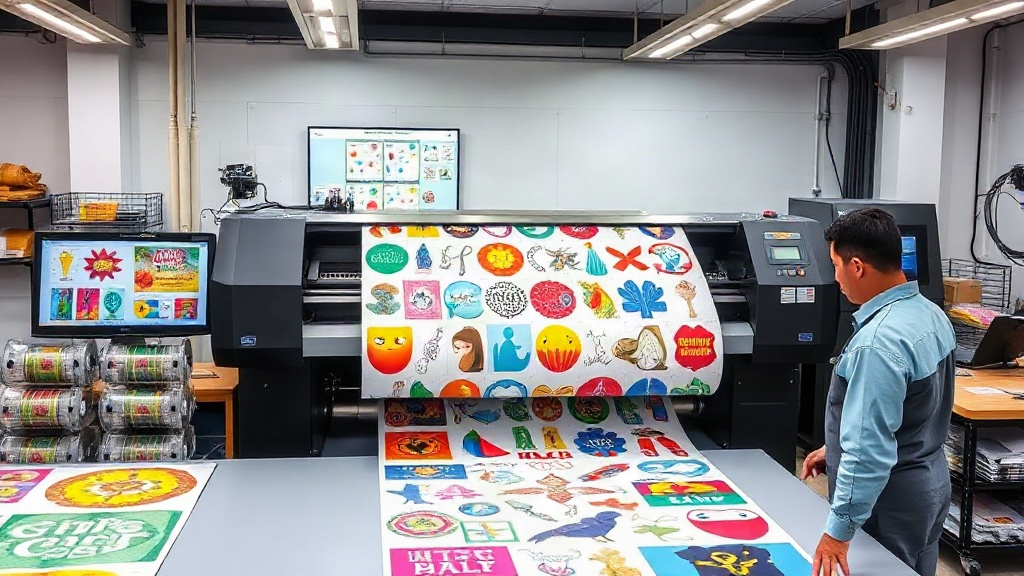
If you run a DTF printing business, you already know that time is money. Every minute spent manually arranging designs on a transfer sheet is a minute not spent printing, shipping, or growing your business. That is where a dtf gangsheet builder comes in. This powerful tool lets you nest multiple designs onto a single sheet, maximizing your transfer film and minimizing waste. But it is not just about saving a few cents on film; it is about transforming your entire production workflow. In this guide, we will walk you through the ins and outs of gang sheet builders, from choosing the right software to mastering layout strategies that boost your bottom line.
What Is a DTF Gangsheet Builder and Why Does It Matter?
A dtf gangsheet builder is a software tool designed to help you arrange multiple DTF transfer designs onto a single sheet of film. Instead of printing each design individually, you create a gang sheet that contains all the designs you need for a batch of orders. This approach is not new; screen printers have been using gang sheets for years to save on setup and materials. But with DTF, the benefits are even more pronounced because you can print full-color, detailed designs without the need for screens or plates.
The primary advantage is material savings. DTF film and powder are not cheap, and every square inch counts. By nesting designs tightly together, you reduce the amount of wasted film. But the savings go beyond materials. When you print a gang sheet, you also save on labor. Instead of loading the printer multiple times, you load it once and produce a sheet that covers many orders. This reduces the risk of errors and speeds up your turnaround time.
Key Features to Look for in a DTF Gangsheet Builder
Not all gangsheet builders are created equal. Some are basic, offering simple drag-and-drop functionality, while others come packed with advanced features that can significantly enhance your productivity. Here are the must-have features that can make a real difference in your shop.
Automatic Nesting and Layout Optimization
Manual nesting is tedious and often inefficient. A good builder uses algorithms to automatically arrange your designs in the most space-efficient way possible. This is especially useful when you have designs of varying shapes and sizes. The software should be able to rotate, flip, and align designs to fill every gap. Some advanced tools even allow you to set a minimum gap between designs, ensuring clean cuts and easy peeling.
Support for Multiple File Formats
Your designs come from various sources: Adobe Illustrator, Photoshop, CorelDRAW, or even client-supplied PNGs. A robust gangsheet builder should support common file formats like PNG, JPG, PDF, and SVG. Ideally, it should also handle transparency correctly, so your DTF prints come out with clean edges and no background artifacts.
Real-Time Cost Calculation
Knowing how much each gang sheet costs is crucial for pricing your products accurately. Look for a builder that calculates the cost based on the amount of film used, ink coverage, and powder consumption. Some tools even integrate with your printer's settings to give you a precise estimate. This feature alone can help you avoid underpricing and protect your profit margins.
Integration with Your Workflow
If you use order management software or an e-commerce platform, check if the gangsheet builder can integrate with it. The ability to import orders directly and generate gang sheets automatically can save hours of administrative work. Even a simple CSV import can be a game-changer for high-volume shops.
How to Choose the Right DTF Gangsheet Builder for Your Business
With so many options on the market, selecting the right tool can feel overwhelming. Start by assessing your production volume. If you are a small shop printing a few sheets a day, a free or low-cost basic tool might suffice. But if you are running a high-volume operation, investing in a premium builder with advanced nesting and automation features will pay for itself quickly.
Consider your team's technical skills. Some builders have a steep learning curve, while others are designed for ease of use. If you have employees who will be using the software, choose one with an intuitive interface and good customer support. Reading reviews and watching demo videos can give you a sense of how the tool works in real-world scenarios.
Finally, think about scalability. Your business will likely grow, and your software should grow with it. Look for a builder that offers regular updates, new features, and the ability to handle larger and more complex gang sheets. A tool that is too basic today could become a bottleneck tomorrow.
Step-by-Step: Creating a Gang Sheet with a Builder
Let us walk through the typical process of creating a gang sheet using a builder. While the exact steps may vary depending on the software, the general workflow is similar.
- Import your designs: Start by uploading all the designs you need to print. Arrange them in a way that makes sense for your orders. Some builders allow you to group designs by order or customer.
- Set your sheet size: Choose the dimensions of your film. Common sizes are 12x12 inches, 12x24 inches, or 13x19 inches. The builder will create a canvas of that size.
- Arrange and nest: Drag and drop your designs onto the canvas. Use the auto-nest feature if available, or manually position them to minimize gaps. Pay attention to the spacing between designs; you need enough room to cut them out later.
- Check for overlaps and margins: Ensure that no designs overlap and that there is a safe margin around the edges. This prevents misprints and makes cutting easier.
- Review and adjust: Most builders show a preview of the final sheet. Take a moment to review the layout. Are there any empty spaces that could be filled with a smaller design? Could you rotate a design to fit better?
- Export and print: Once you are satisfied, export the gang sheet as a high-resolution file. Then send it to your DTF printer. Some builders can send the file directly to the printer, streamlining the process further.
Expert Tips for Maximizing Efficiency with a DTF Gangsheet Builder
Even with the best software, how you use it matters. Here are some tips from experienced DTF printers to help you get the most out of your gangsheet builder.
Group Similar Designs Together
If you have multiple orders for the same design, place them close together on the sheet. This reduces the time spent cutting and sorting. It also makes it easier to keep track of which transfers go to which order.
Use Standard Sheet Sizes
Standard sheet sizes like 12x12 or 12x24 are easier to handle and store. They also fit neatly into most DTF printers. Custom sizes can lead to more waste and longer setup times. Stick to standard sizes unless you have a specific reason to deviate.
Optimize Your Nesting Settings
Most builders have settings for gap size, rotation, and nesting effort. Experiment with these to find the sweet spot between tight nesting and easy cutting. Too tight, and you risk damaging designs when cutting; too loose, and you waste film.
Keep Your Design Files Organized
A cluttered file system slows you down. Name your files clearly and store them in folders by category or client. When you import designs into the builder, you will spend less time searching and more time printing.
Regularly Update Your Software
Developers are constantly improving their tools. Updates often include new features, bug fixes, and performance improvements. Make it a habit to check for updates and install them promptly.
Common Mistakes to Avoid When Using a Gangsheet Builder
Even seasoned printers can fall into traps. Here are some pitfalls to watch out for.
- Overlooking the importance of resolution: Always use high-resolution images (300 DPI or higher) to ensure crisp prints. Low-res images will look pixelated and unprofessional.
- Forgetting about color profiles: DTF printers use CMYK inks, but your designs might be in RGB. Convert them to CMYK and proof the colors to avoid surprises.
- Ignoring the white layer: DTF printing requires a white ink base. Make sure your builder accounts for this and that your designs have proper white underbase settings.
- Not leaving enough gap: A gap that is too small can cause designs to merge during printing or make cutting difficult. A gap of 2-3 mm is usually safe.
- Printing without a test: Before committing to a full gang sheet, print a small test to check colors, alignment, and adhesion. This can save you from wasting a whole sheet.
Frequently Asked Questions About DTF Gangsheet Builders
What is the best DTF gangsheet builder for small businesses?
The best builder depends on your specific needs and budget. For small businesses, tools like DTF Gang Sheet Builder, Gang Sheet Maker, and some free online options can be sufficient. Look for ease of use, good nesting, and affordable pricing. Many offer free trials, so you can test before committing.
Can I use a gangsheet builder with any DTF printer?
Yes, most gangsheet builders are software-based and generate standard file formats that can be printed on any DTF printer. However, some builders may have specific optimizations for certain printer brands. Always check compatibility with your printer model.
How do I calculate the cost of a gang sheet?
To calculate cost, add up the cost of film, ink, powder, and labor. Most gangsheet builders provide an estimate based on film area. For a more accurate figure, factor in your printer's ink consumption and the time spent. Then divide by the number of designs to get a per-design cost.
Is it better to use a gangsheet builder or manually arrange designs?
For any production beyond a few sheets, a gangsheet builder is far superior. It saves time, reduces waste, and minimizes errors. Manual arrangement is only practical for very small batches or one-off prints.
Can I reuse gang sheets for repeat orders?
Yes, you can save your gang sheet layouts and reuse them for future orders. This is especially useful for popular designs. Just update quantities as needed and export a new sheet.
Incorporating a dtf gangsheet builder into your workflow is one of the smartest investments you can make for your DTF business. It streamlines production, cuts costs, and allows you to take on more orders without sacrificing quality. Whether you are just starting out or looking to scale, the right tool can make all the difference. Take the time to evaluate your options, test a few builders, and find the one that fits your needs. Your bottom line will thank you.